
Iponance app icon Iponance

Your money, minus the mystery.

Iponance is a private budget and bill tracker.

For iPhone, iPad, Mac and Android

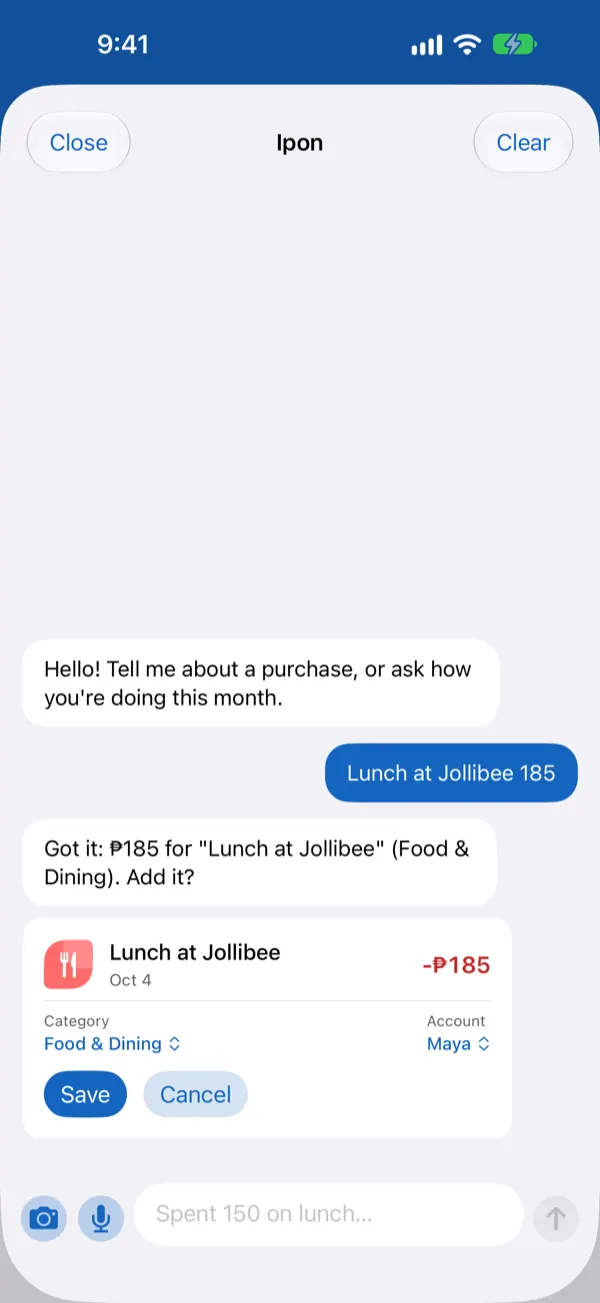
Chatting with the assistant: “Lunch at Jollibee 185” becomes a ready-to-save expense

Type it, say it or snap it, and Iponance keeps the tally while you get on with your day. No account, no ads, and your records stay with you.

Why people like it

  • No sign-up

    Open it and start. There’s no account to make and no password to forget.

  • Speaks Taglish

    The assistant understands English, Tagalog and Taglish, typed or spoken.

  • Stays with you

    Your records live on your devices. Sync is optional and goes through your own iCloud or Google Drive.

  • Moving in is easy

    Bring your history from Money Manager, Wallet, Spendee, Money Lover, YNAB and more, and check it before it’s saved.

  • Pay once

    A 14-day free trial, then a one-time unlock. No subscription.

  • Always within reach

    Widgets, quick logging, an Apple Watch app, and roomy layouts for iPad, Mac and Android tablets.

What Iponance does

Just say it

Talk to Iponance like you’d text a friend who is good with receipts.

  • Hold the mic, say “lunch 250 from GCash”, let go, and the details fill themselves in for you to check
  • Or type it the way you’d text it: “salary 25,000”, “moved 500 from GCash to BPI”
  • Made a typo? Just say “change that to 250”
  • The assistant learns from your corrections and understands English, Tagalog and Taglish
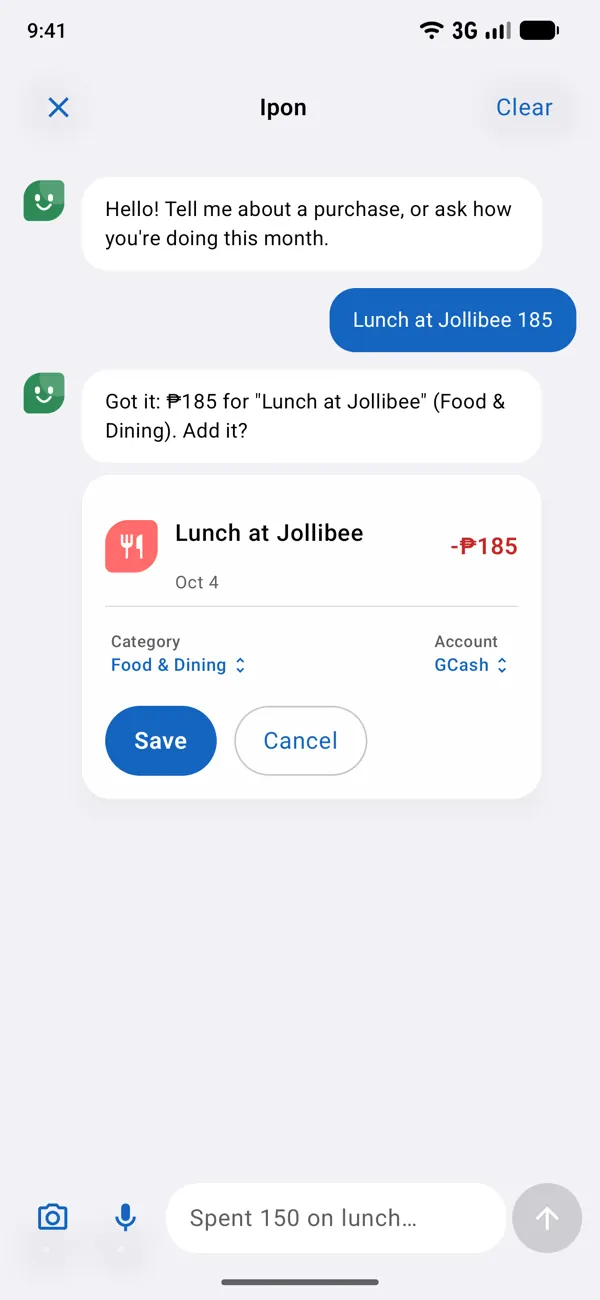
Iponance on Android: logging lunch by chatting with the assistant

New in v1.5 · Snap & Shop

Snap it, list it

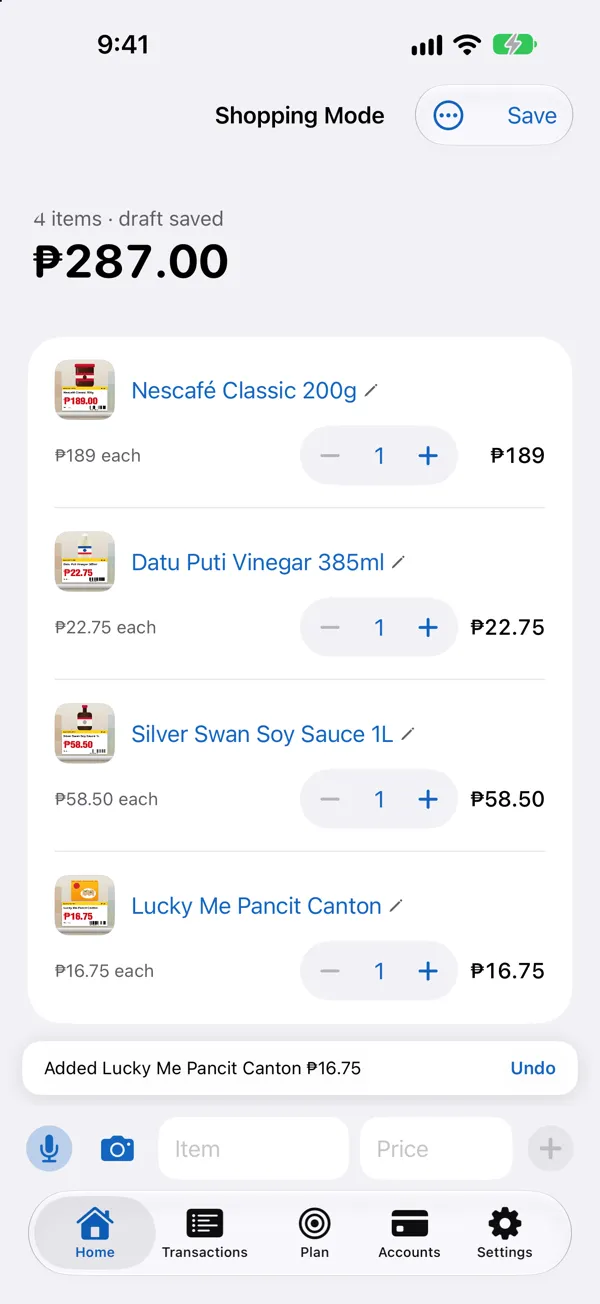
Point at the price tag. Iponance adds it with the price and a photo.

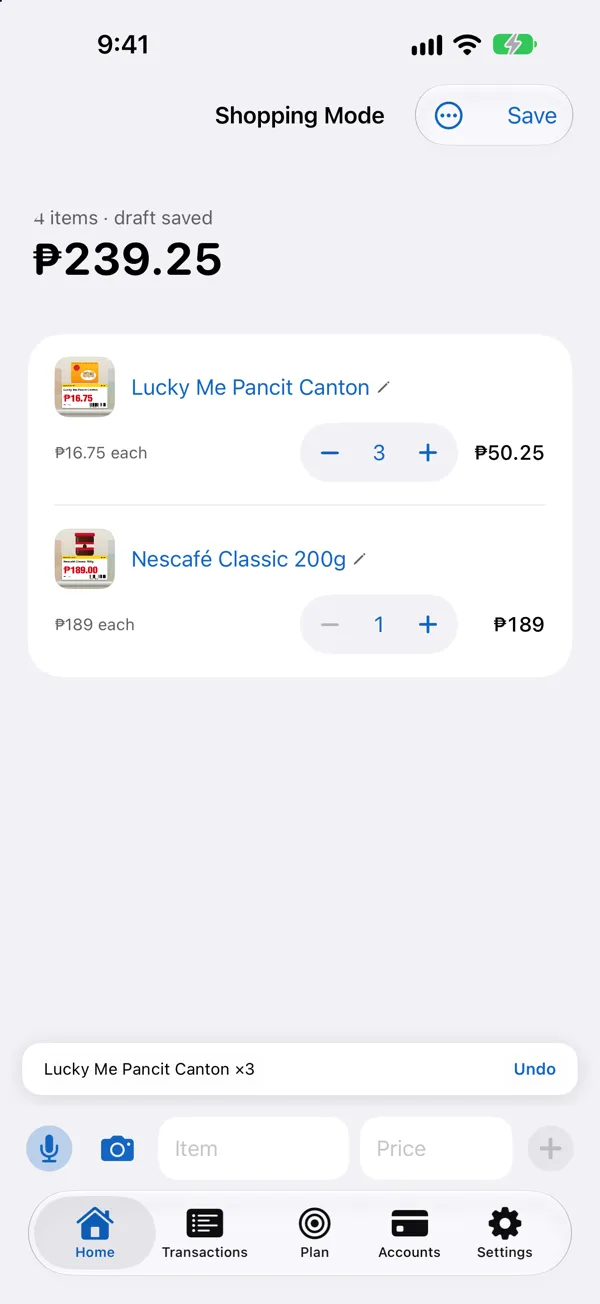
  • In Shopping Mode, tap the camera and snap a product with its price tag: the name, the price and a photo go straight into your list
  • Same item again? Snap it again and the quantity goes up, so the total stays right
  • Every item has − and + for the quantity, and a tap on the name or price fixes it
  • Changed your mind? Undo is one tap, and the price tag is read on your device
Shopping Mode after snapping four price tags: Nescafé Classic, Datu Puti Vinegar, Silver Swan Soy Sauce and Lucky Me Pancit Canton, each with its photo, price, − and + and line total, and “Added Lucky Me Pancit Canton ₱16.75 · Undo”

Hold, talk, done

Talking is quicker than typing. Now there’s a button made for it.

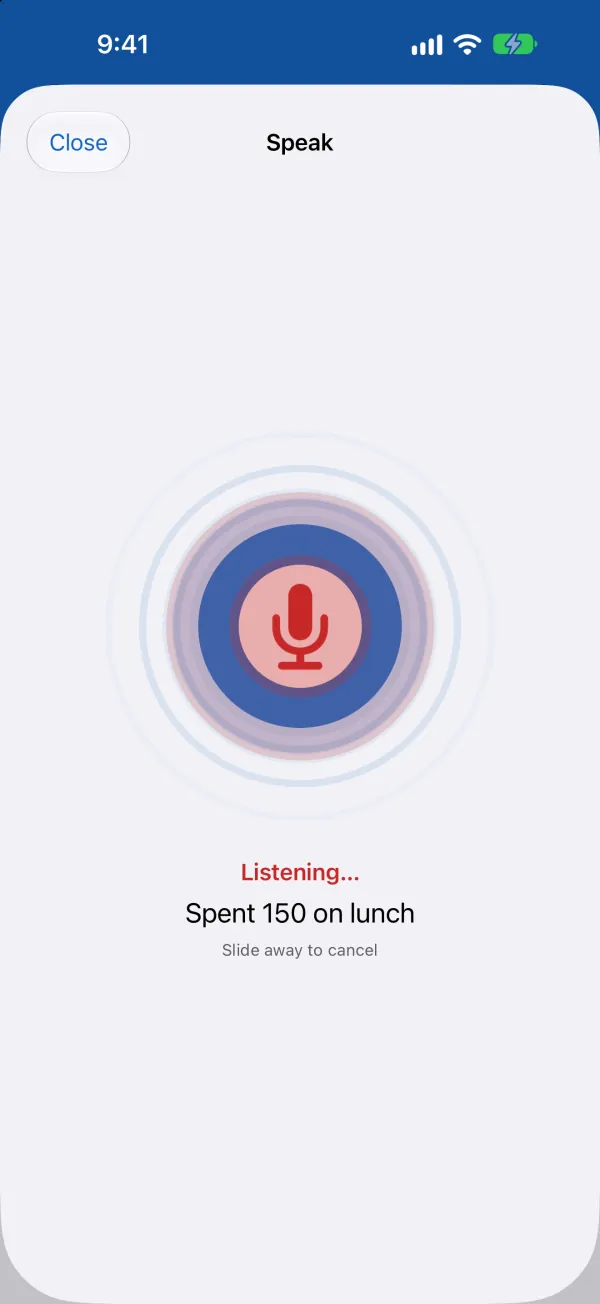
  • Hold the mic and talk, let go, and the transaction form fills itself in for you to check
  • Or tap + › Speak and hold the big round button
  • Rather not hold? A quick tap starts, a second tap stops
  • Changed your mind? Slide away to cancel
The Speak screen: holding the round microphone button while saying “Spent 150 on lunch”

Moving in? Bring your history

Switching apps shouldn’t mean starting from zero.

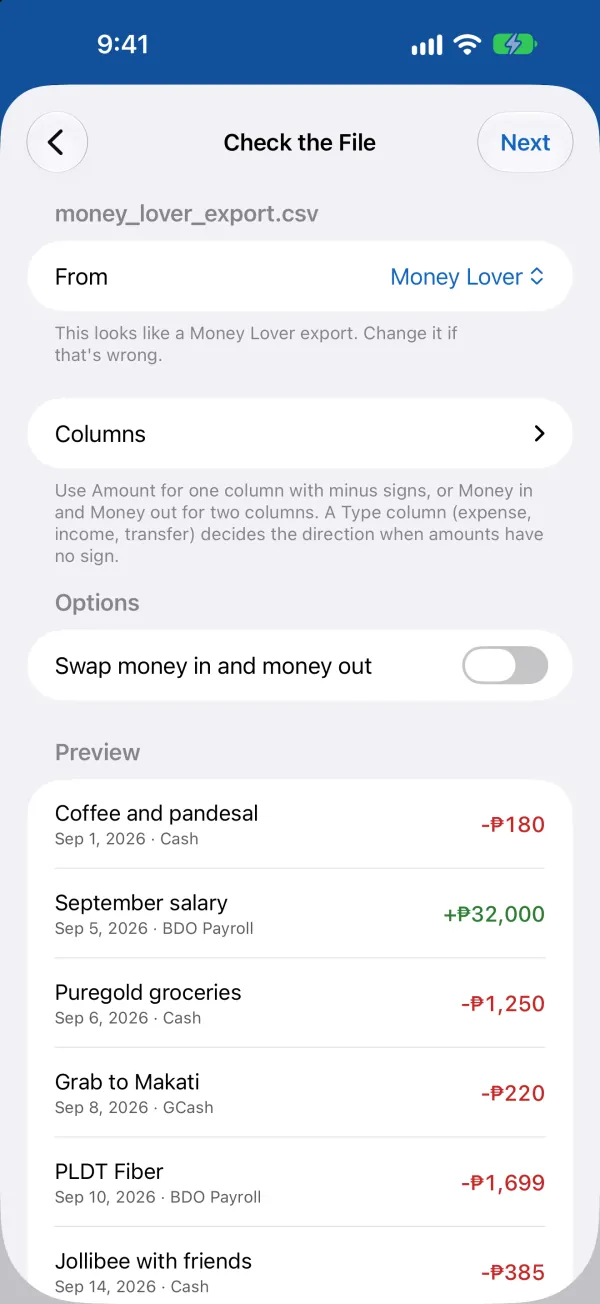
  • Import from Another App reads the exports of Money Manager, Wallet, Spendee, Money Lover, Monefy, YNAB, Bluecoins and Goodbudget
  • Bank statements and any spreadsheet with dates and amounts work too: match the columns once, for apps such as Agila or Tarsi, and Iponance remembers
  • Anything that looks already logged is flagged, and you check everything before it’s saved
  • Changed your mind? Undo the whole import from Import History
Import from Another App checking a Money Lover export: where it came from, its columns and a preview of the transactions

Snap your bank app

Screenshots: finally good for something besides memes.

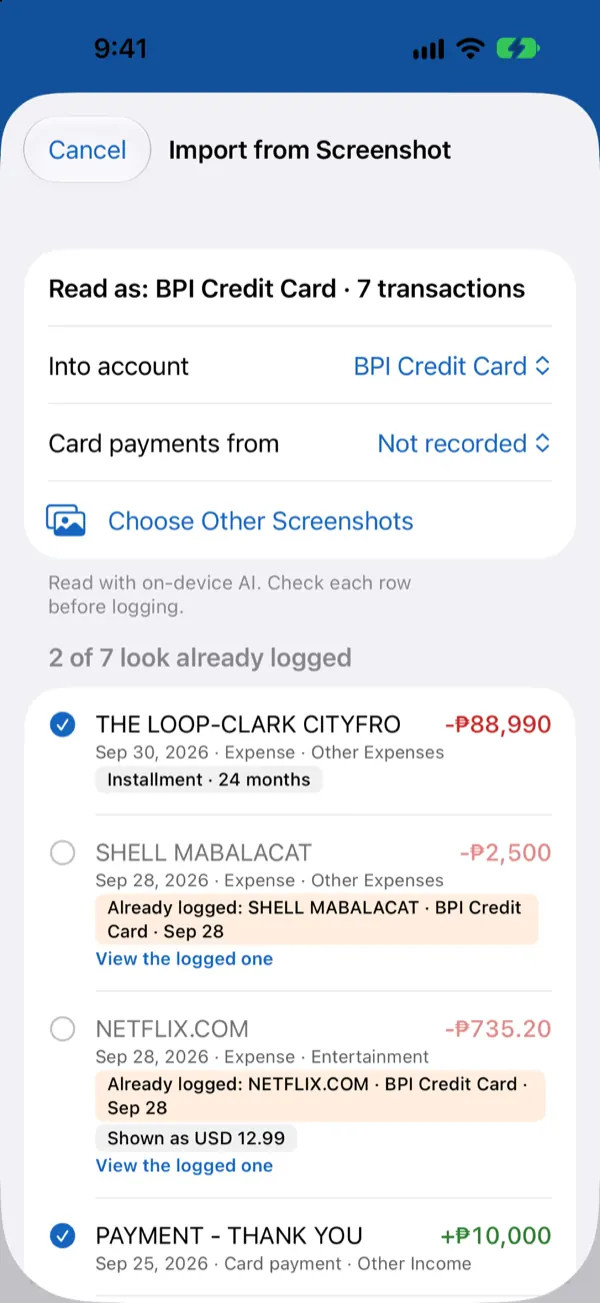
  • Import from Screenshot reads every transaction in a screenshot of your bank or e-wallet app
  • Anything you already logged is flagged, so nothing gets counted twice
  • Bank statements (CSV or PDF) work too, and you check everything before it’s saved
Import from Screenshot: transactions read from a credit card app, with the ones already logged flagged

Split it, sorted

Dinner for three, one bill, zero awkward math.

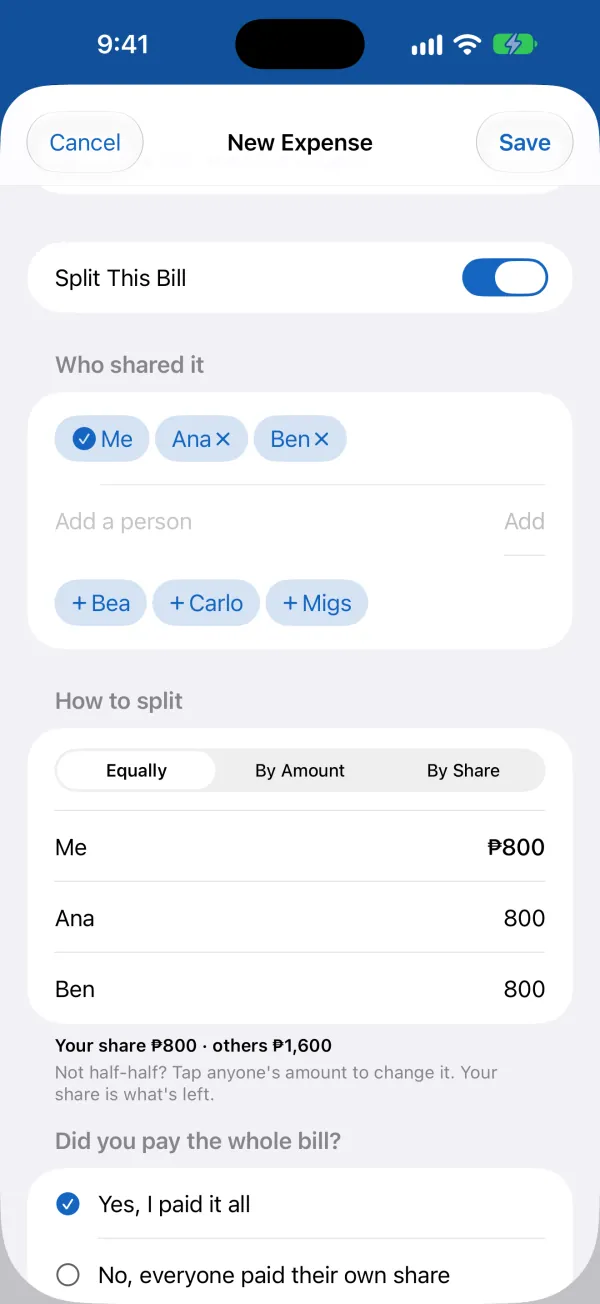
  • Split This Bill right in the expense: equally, by amount or by share
  • “Did you pay the whole bill?” Say you paid it all, everyone paid their own share, or someone else did
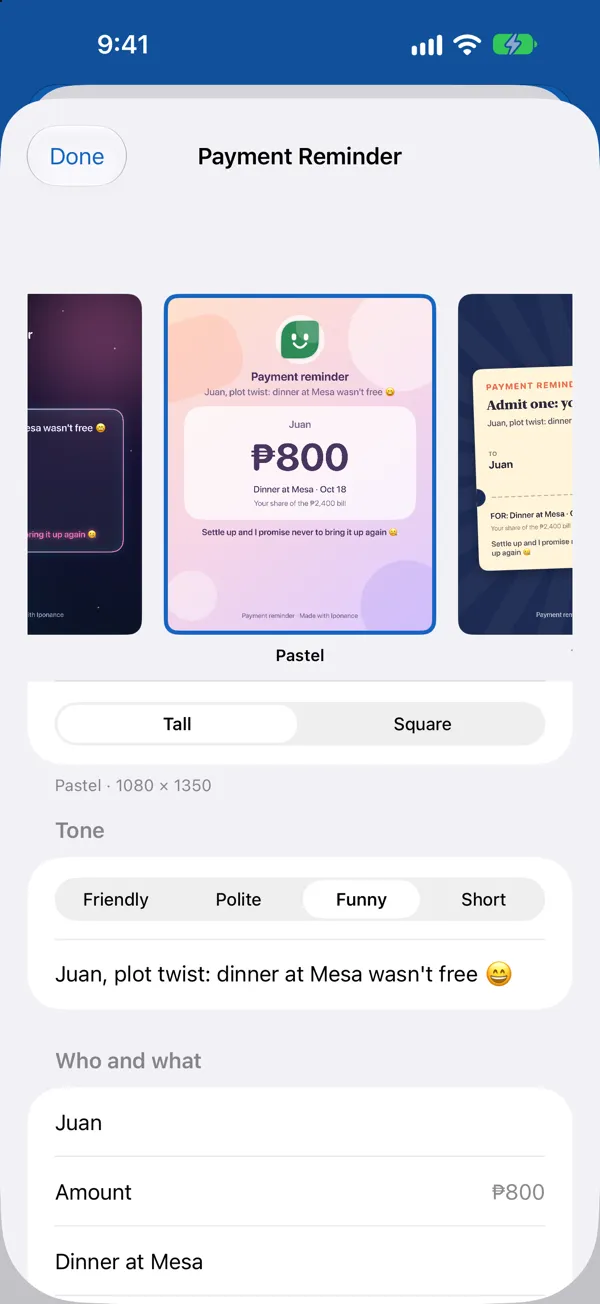
  • Ask for Payment makes a reminder card for each person who owes you, with Halloween designs and a witty Funny tone
  • Someone else paid? It’s kept as money you owe them, and your own accounts don’t change
Split This Bill on a new expense: shared equally by Me, Ana and Ben, with “Did you pay the whole bill?” below

New in v1.5 · Snap & Shop

Pay back, on time

Promises with a date, and a nudge before the day comes.

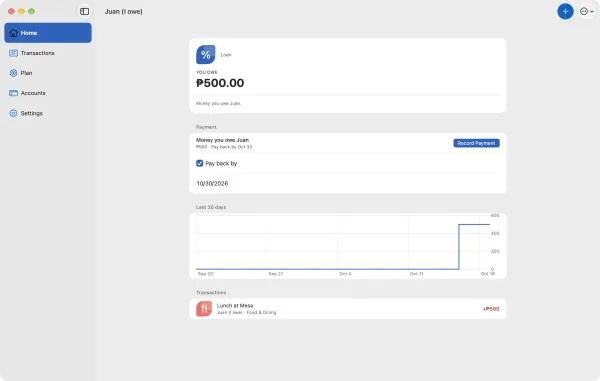
  • Owe Juan for lunch? Add an optional “Pay back by” date to the money you owe him, or tell the chat “I’ll pay Juan back by Oct 30”
  • Juan owes you? Give it a “Due by” date, and on the day Iponance offers to make him a reminder card
  • A reminder comes the day before you promised to pay and again on the day, with Pay Now right there
  • Ask the chat “who do I owe?” to see everyone you owe, how much and by when
Iponance on the Mac: Juan (I owe), ₱500 you owe Juan for Lunch at Mesa, with “Pay back by” ticked and set to Oct 30, and Record Payment beside “₱500 · Pay back by Oct 30”

Receipts, found

The kitchen drawer of warranty cards can retire now.

  • Photograph a receipt and Iponance fills in the amount, store and date
  • Keep a receipt with its warranty, and get a reminder before the warranty ends
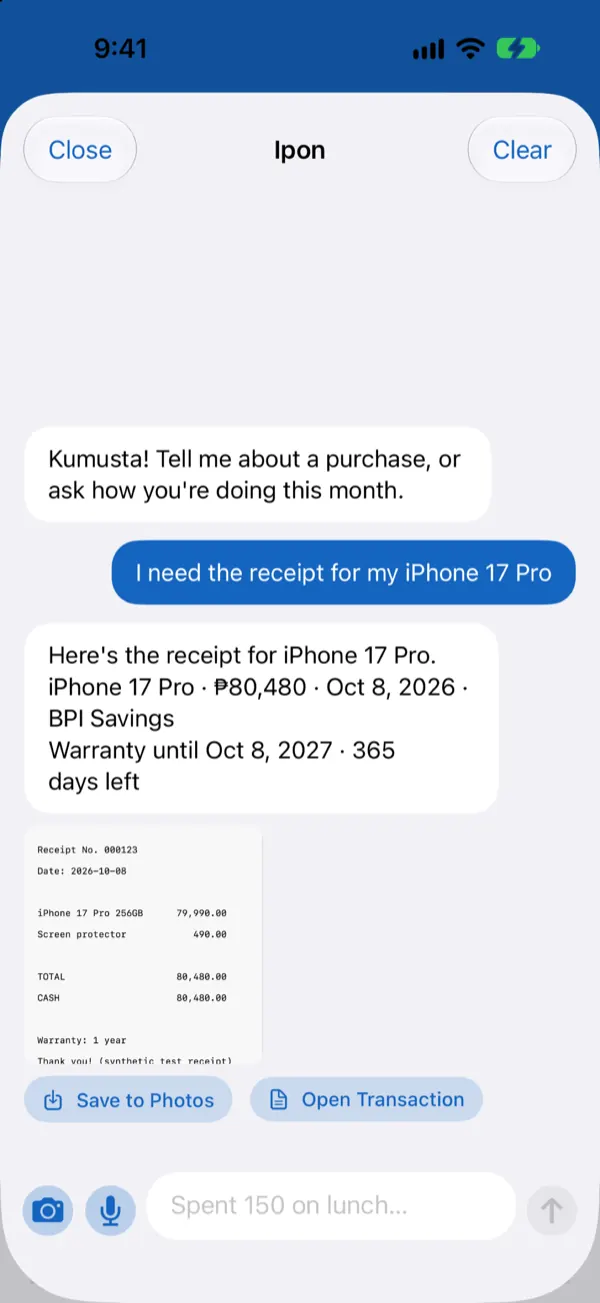
  • Ask the assistant “I need the receipt for my iPhone” and there it is
The assistant finds the receipt for an iPhone, with the warranty end date and days left

A plan with a pulse

Budgets, goals and bills in one calm place.

  • Budgets that warn you before you overspend
  • Savings goals kept in real accounts, with a gentle nudge before you spend goal money
  • Safe to spend: what you can use each day until your next income
  • Loans with a payment calculator and a debt payoff plan
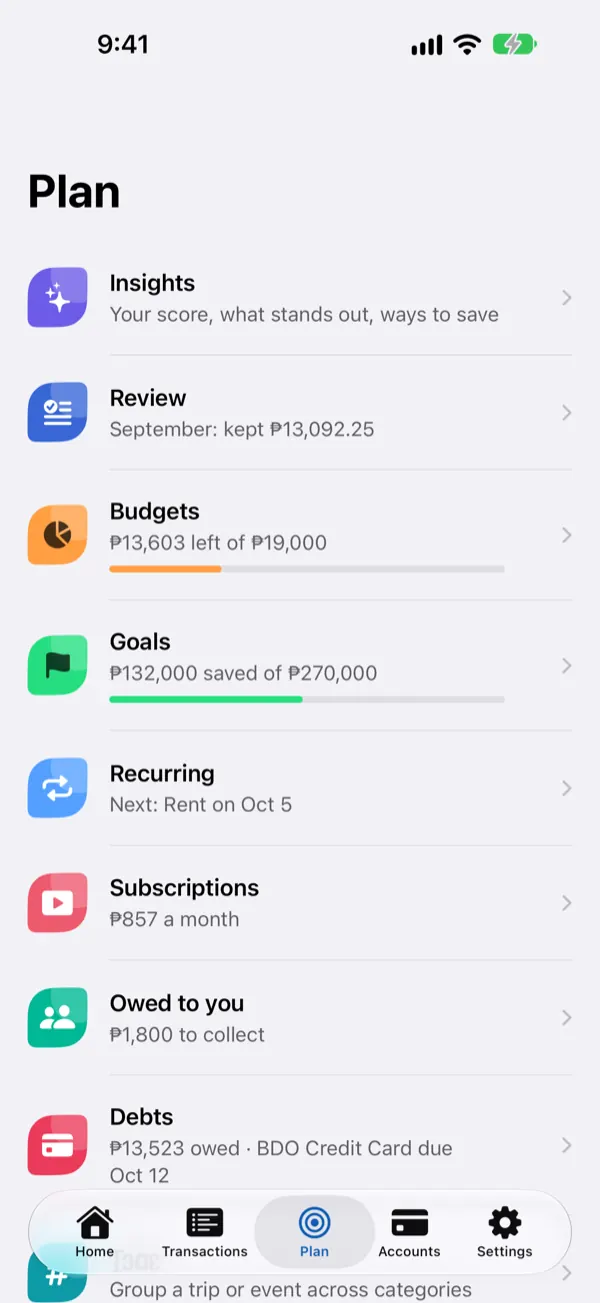
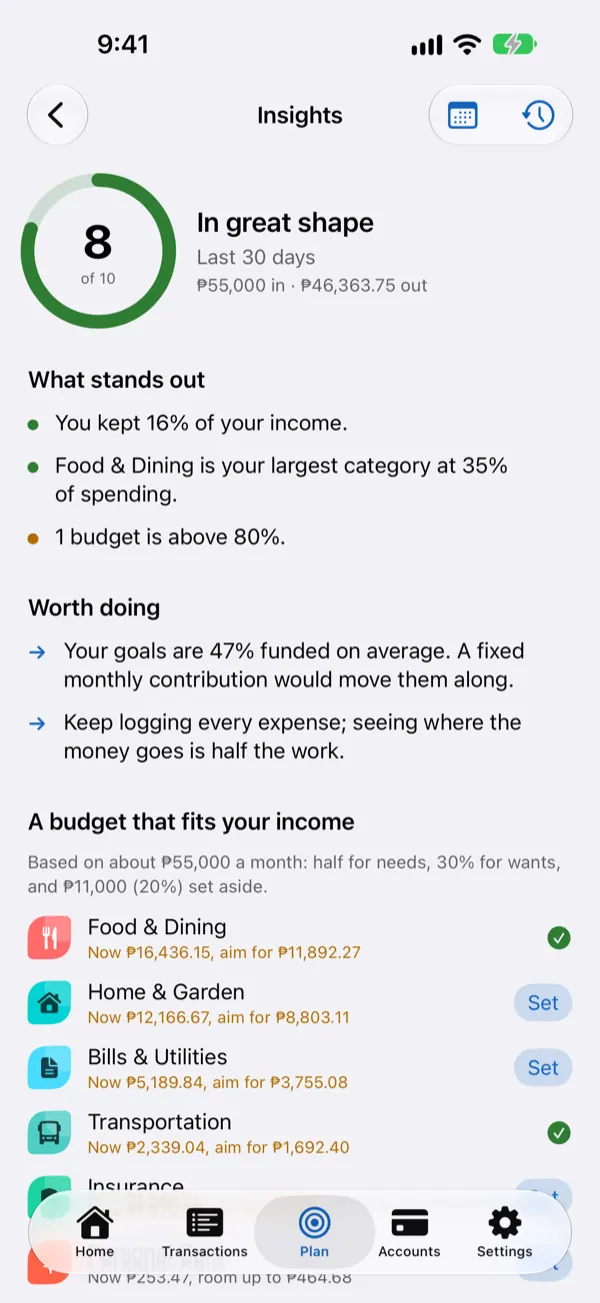
Plan tab: insights, a look back at last month, budgets, goals, recurring bills, subscriptions, money owed to you and debts

Bills that knock first

Due dates, meet your match.

  • Bills and recurring payments that ask “Did you pay?” instead of guessing
  • Credit card statement and due dates, with reminders before payment is due
  • Insurance renewals and subscription price changes, flagged ahead of time
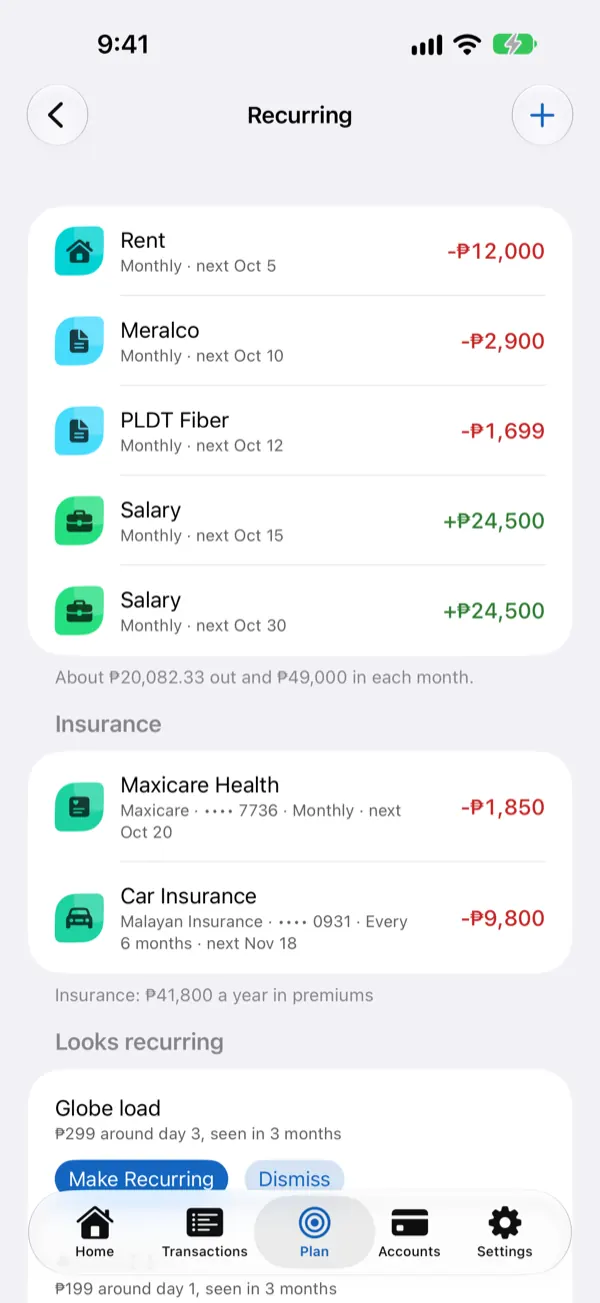
Recurring payments: rent, electricity, internet, salary and insurance with their next due dates

Know where you stand

A friendly check-up, minus the lecture.

  • Insights with a score, what stands out and ways to save
  • Net Savings: what you have minus what you owe, in any currency
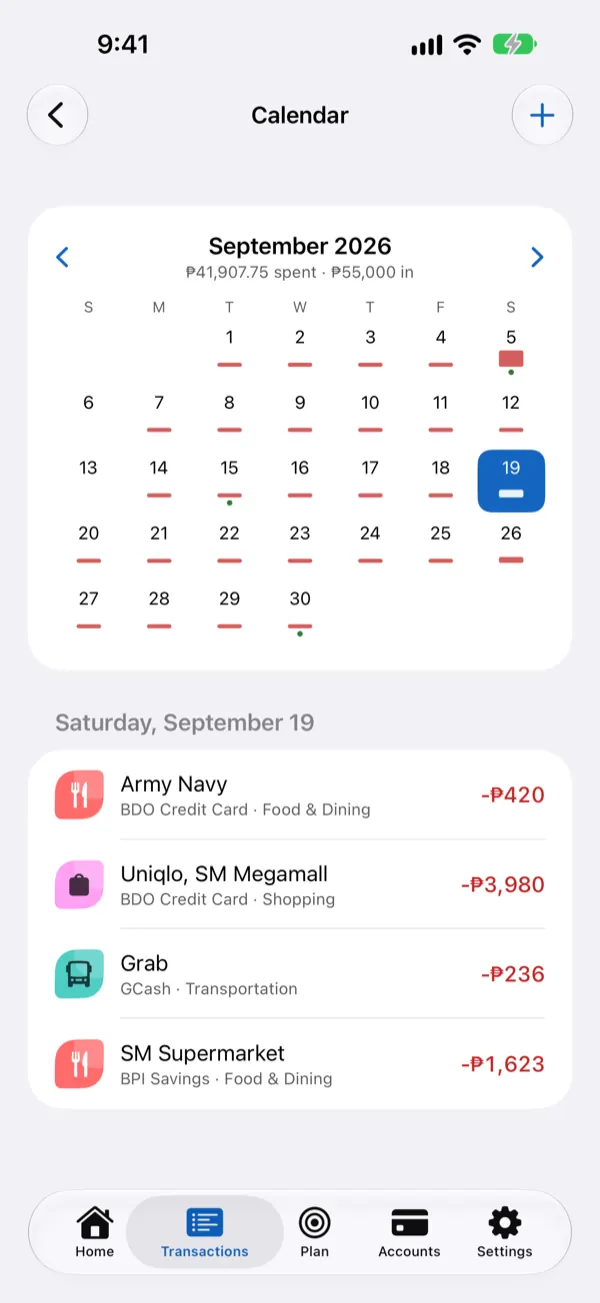
  • A calendar that shows what went out, day by day
Calendar of spending with the expenses for one day listed below it

Reminders without the awkward

For money owed to you, minus the uncomfortable follow-up.

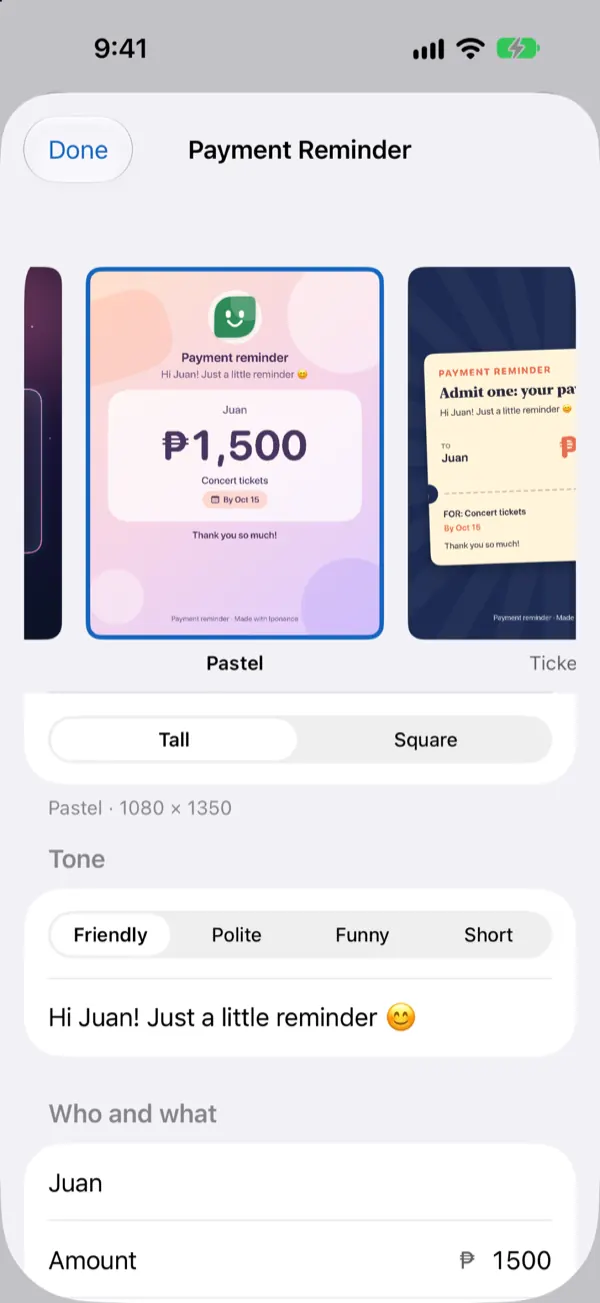
  • Make a cute payment reminder card, such as Pastel, Polaroid or Chat Bubble, and send it in any chat app
  • Pick a tone: friendly, polite, short, or a witty funny one
  • Seasonal designs too, for when the mood fits
  • Make one from the chat, or right after you split a bill
Payment reminder card builder with templates and a friendly, polite, funny or short tone

For the family, and the side hustle

Everyone’s share, and the store’s, kept straight.

  • Tag spending by family member and see each person’s share
  • Savings you hold for someone else, such as your child’s, kept out of your own totals
  • Business mode gives your store or freelance work its own accounts, with profit and margin kept apart from your personal money

Room to spread out

Big screen? Iponance makes good use of it.

  • Layouts made for iPad, Mac and Android tablets, with more on screen at once
  • Also on the Mac, from the same App Store listing: one purchase covers your iPhone, iPad and Mac
  • Your records stay in step through your own iCloud or your own Google Drive
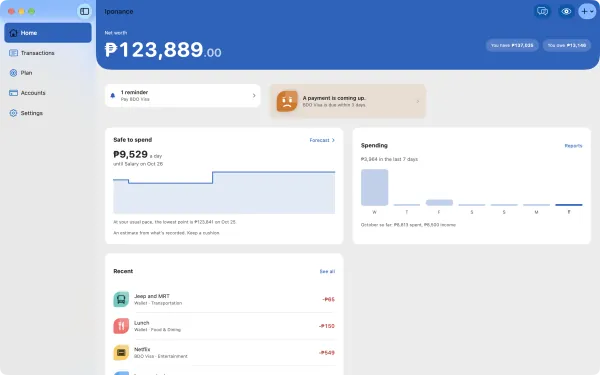
Iponance on the Mac: net savings, safe to spend, the week’s spending and recent transactions in one window

Sync, your way

iCloud full? Your records keep moving anyway.

  • When your iCloud storage is full, choose Google Drive and syncing carries on
  • iPhone, iPad and Mac can all sync through your own Google Drive
  • An iPhone and an Android phone can stay the same, too
  • Either way, it’s locked with a sync password only you know

Private by design

Your finances are nobody else’s business.

  • No sign-up, no ads, no analytics, no tracking
  • Face ID, Touch ID or fingerprint lock, and Hide Balances for when someone is looking
  • Optional sync through your own iCloud or your own Google Drive, locked with a sync password only you know
  • On supported devices, on-device AI for messier receipts and messages
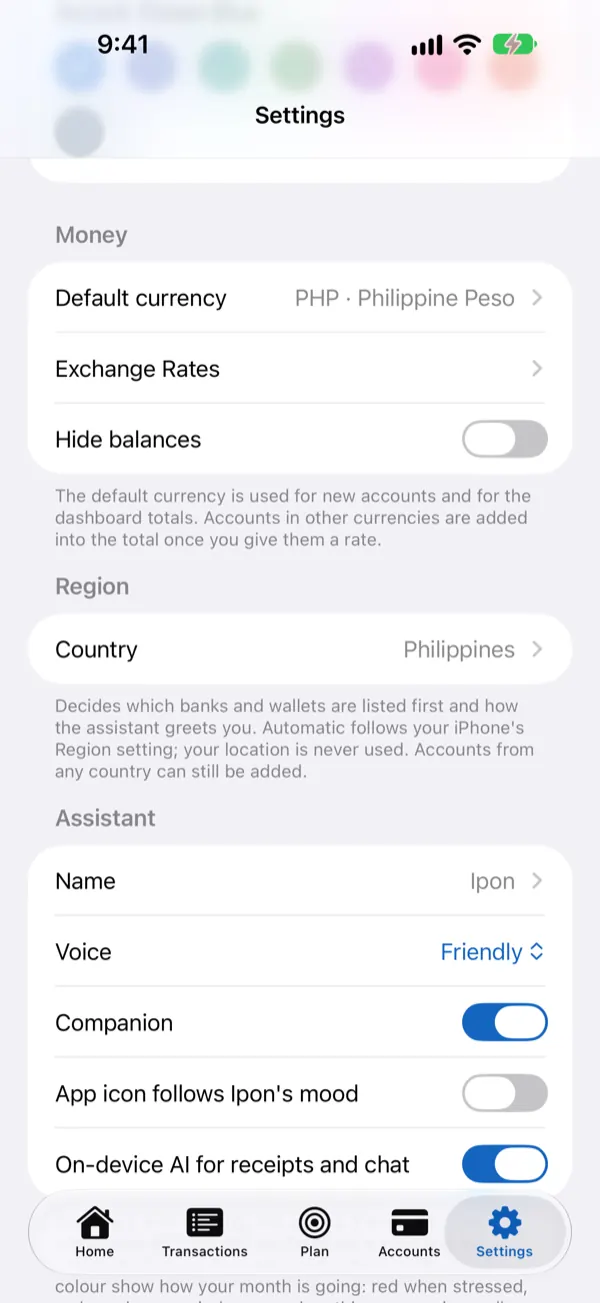
Settings: default currency, exchange rates, Hide Balances, the assistant’s name and on-device AI

In plain words

Iponance is a personal finance tracker that keeps your money private. Log what you spend in seconds, see where it goes, and get reminded before bills and card payments are due. No account to create, no ads, no subscriptions. Everything stays on your device.

Available for iPhone, iPad, Mac and Android.

Iponance is a record-keeping tool. It never connects to your bank or moves money, and it is not financial advice. Bank and wallet names are used only so you can recognise your own accounts; they belong to their owners, who do not sponsor or endorse this app.

Everything Iponance does

Log it your way

  • Type it: "lunch 150", "salary 25,000", "moved 500 from GCash to BPI"
  • Say it: hold the microphone and talk, use the Speak button, or ask Siri
  • Scan it: take a photo of a receipt and Iponance fills in the amount, store and date for you to check
  • Tap it: Quick Add widgets and Apple Watch for the things you buy often
  • Snap it: Import from Screenshot reads every transaction in a screenshot of your bank or e-wallet app and flags the ones already logged
  • Import it: bring in a bank statement (CSV or PDF) and review before saving
  • Move in: Import from Another App brings your history from Money Manager, Wallet, Spendee, Money Lover, Monefy, YNAB, Bluecoins, Goodbudget or any spreadsheet, flags what's already logged, and can be undone

Your accounts, all in one place

  • Cash, bank accounts, e-wallets, credit cards and loans
  • Net worth: what you own and what you owe, in any currency
  • Credit card limits, statement and due dates, with reminders before payment is due

Plan ahead

  • Budgets that warn you before you overspend
  • Savings goals kept in real accounts, with a gentle warning before you spend goal money
  • Bills and recurring payments that ask "Did you pay?" instead of guessing
  • Insurance of any kind (health/HMO, car, house, life, business) with renewal reminders
  • Subscriptions, with a nudge when a price changes
  • Safe to spend: what you can use each day until your next income
  • Loans with a calculator for the monthly payment, a debt payoff plan and installment tracking
  • Warranty receipts kept until the warranty ends, with a reminder before it does

For families

  • Tag spending by family member and see each person's share
  • Savings held for someone else, such as your child's savings, tracked separately and never counted in your own totals
  • Split This Bill: equally, by amount or by share, and tick people off as they pay you back
  • Friendly reminder cards for money owed to you, with seasonal designs and a witty Funny tone, ready to send in any chat app

For your business

  • Run a store, bakery or freelance work on the side? Give it its own accounts, record sales, operating costs and equipment, and see profit, margin and runway, kept apart from your personal money

A friendly assistant, on your device

  • Ask "How am I doing this month?" or "Can I afford a new phone?"
  • Ask for a receipt: "I need the receipt for my iPhone" shows it with its warranty
  • Understands English, Tagalog and Taglish; replies in English
  • Fix entries in plain words: "change that to 250"
  • A companion whose face shows how your month is going
  • Insights with a score, what stands out, and ways to save
  • On devices with Apple Intelligence, optional on-device AI for messier receipts and messages

Private by design

  • No sign-up, no ads, no analytics, no tracking
  • Face ID or Touch ID lock, and Hide Balances for when someone is looking
  • Sync across your iPhone, iPad and Mac through your own iCloud, locked with a sync password only you know
  • Or sync through your own Google Drive, for example when your iCloud storage is full or to keep an Android phone in step, encrypted the same way
  • Backup to a file, with optional password protection, and restore on iPhone or Android
  • Chat history is kept for 30 days, then deleted automatically

Everywhere you are

  • Layouts made for big screens on iPad, Mac and Android tablets
  • Home Screen and Lock Screen widgets
  • Apple Watch app: safe to spend, your companion, and quick logging
  • Siri and Shortcuts: say "Tell Ipo", then "lunch 250 from GCash"

Questions, answered

Do I need to create an account?

No. Open the app and start: there’s no sign-up and no login.

Sign in with Google only appears if you choose to sync through your own Google Drive: with the Android version, or when your iCloud storage is full.

Does Iponance connect to my bank?

No. Iponance is a record-keeping tool. It never connects to your bank or moves money. You add things yourself, by typing, talking, scanning a receipt, or importing a screenshot or statement.

Does it read price tags offline?

Yes. Snap Item in Shopping Mode reads the price tag right on your iPhone, iPad, Mac or Android device, so it works without a connection. The photo stays with the item in your shopping list.

If a price or name comes out wrong, tap it to fix it.

Can it remind me to pay someone back?

Yes. Open the money you owe a person, such as Juan (I owe), tick Pay back by and pick a date. Iponance reminds you the day before and on the day, with Pay Now right in the reminder.

For money someone owes you, set a Due by date in Owed to You, and on the day you’re offered a reminder card to send. Ask the chat “who do I owe?” any time to see everyone you owe.

Can I bring my records from another app?

Yes. Settings › Import from Another App reads the export of Money Manager, Wallet, Spendee, Money Lover, Monefy, YNAB, Bluecoins or Goodbudget, a bank statement, or any spreadsheet with dates and amounts. For other apps, such as Agila or Tarsi, you match the columns once and Iponance remembers.

Anything that looks already logged is flagged, you check everything before it’s saved, and Import History can undo the whole import.

Where is my information kept?

On your own devices. If you turn on sync, it goes through your own iCloud or your own Google Drive, locked with a sync password only you know. The Privacy Policy has the details.

What if my iCloud storage is full?

Choose Google Drive in Settings › Sync and syncing carries on through your own Google Drive instead. iPhone, iPad and Mac can all sync this way, and an Android phone can join in. It’s locked with the same sync password only you know, and Iponance can only see its own hidden space in your Drive.

How much does it cost?

Everything is free for 14 days. After that, a one-time purchase unlocks Iponance; there’s no subscription. Your information is never held back: after the trial you can still view, back up, export and erase everything.

Is Iponance on the Mac and on tablets?

Yes. Iponance has layouts made for big screens on iPad, Mac and Android tablets. On the Mac it comes from the same App Store listing as on iPhone, and one purchase covers your iPhone, iPad and Mac.

Which languages does it understand?

The assistant understands English, Tagalog and Taglish, and replies in English.

Is this financial advice?

No. Iponance helps you keep track of your own money; the decisions stay yours.

Ready to meet your money?

Try everything free for 14 days, then keep it with a one-time unlock. No subscription, no ads.

Need a hand?

Questions, feedback or a problem with Iponance? Send us a message.

Get support

Developer: Aldwin Nunag

Privacy and terms